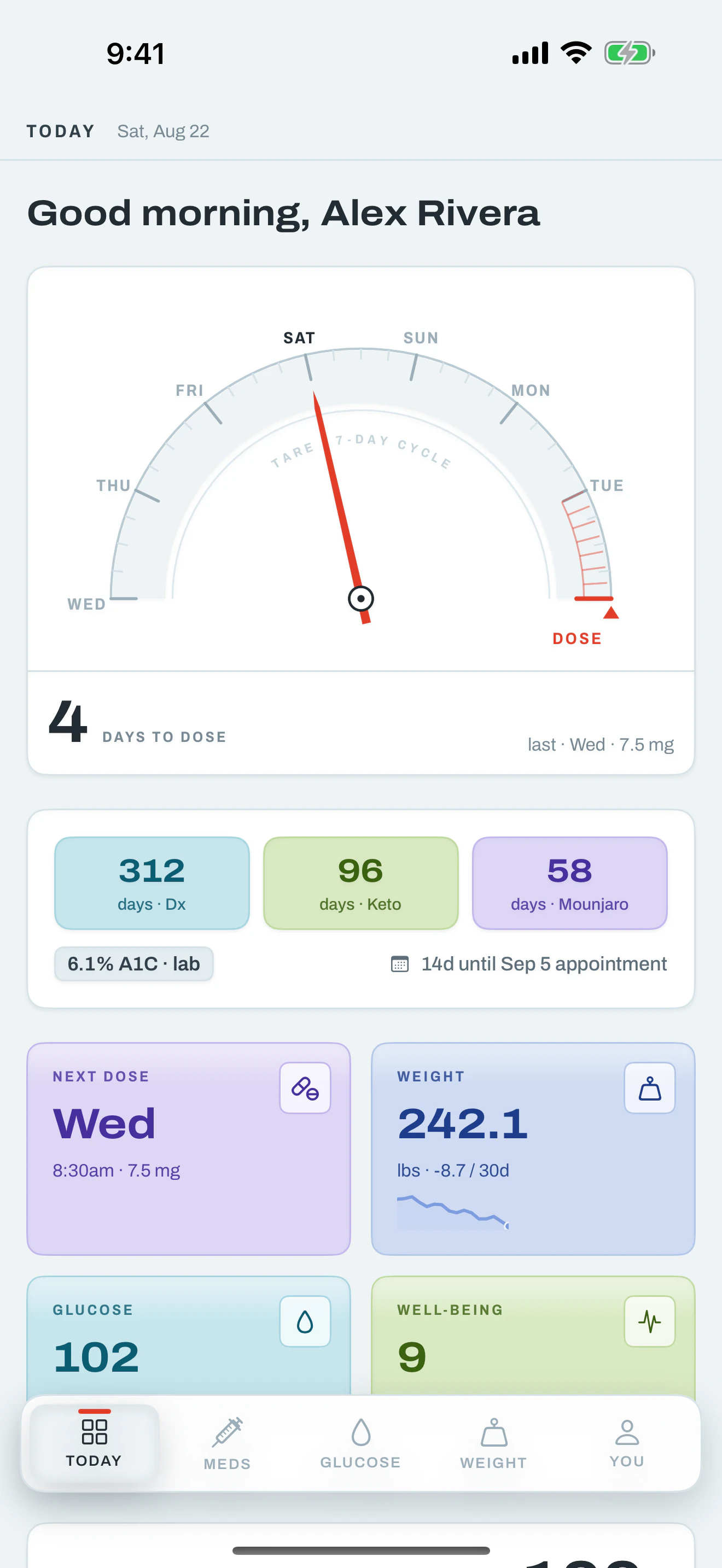
Next Dose
Days until your next injection.
- Small
- Medium
- Lock Screen
Built for iPhone, iPad and Apple Watch
Glucose, doses, weight and well-being in one calm instrument panel — built natively for iOS, synced through your own iCloud, and usable with no account at all.

Tare no longer has a supported browser interface or web sign-in. Production web traffic is relay-only for optional native AI features: there is no installable PWA, offline web mode, or browser background-reminder claim. The legacy web database remains isolated while final native migration and deletion validation completes; it is not connected to the native store and is not represented as already deleted.
No account
No sign-up, no password, no server-side profile. Open it and start.
On device
Everything lives in a local store, mirrored only to your own iCloud.
Two-way Apple Health
Weight, glucose and water sync both directions. Steps and sleep read in.
AI off by default
Nine assisted features, every one behind a switch that starts off.
Recorded release views
These paired iPhone and iPad images come from the version 1.0 build 31 release-visual set. They were recorded in Simulator with one fixed, entirely fictional data set; they are not physical-device evidence.


Apple Health
Weight, glucose and water move in both directions, so a reading taken on a smart scale or a connected meter shows up in Tare — and anything you log in Tare shows up in Health. Water works a little differently: after writing what you logged to Health, Tare re-totals the day’s figure straight from Health, rather than preserving your entered value as an override. Steps and sleep are read in to give your check-ins context.
What you typed always wins
For weight and glucose, if a reading exists in both places, the value you entered in Tare is the one kept — imported samples never overwrite your own. Water is the exception: its daily total is always re-read from Health, by design.
Automatic after you opt in
New Health data is imported whenever you open or return to Tare.Sync now remains available, and the setting can be turned off at any time.
Widgets & Live Activities
Five widgets across the Home Screen, the Lock Screen and StandBy — plus a Live Activity that counts down dose day in the Dynamic Island. Each one opens straight to the screen it’s about.
Home Screen
4d
Sun · 7.5 mg
102
mg/dL · Normal
242.1
lbs · 58% to goal
Widget and Live Activity illustrations on this page are synthetic UI studies. The release manifest does not include recorded widget captures.
Lock Screen & StandBy
9:41
Wednesday 5 August
◷ Tare · 102 mg/dL Normal
Live Activity · Dynamic Island
Days until your next injection.
Your latest reading, and whether it is in band.
Your latest weight, and progress toward your goal.
Dose, weight, glucose and estimated A1C in one card.
Jump straight to logging a meal from a photo.

watchOS 26.5 Simulator
Apple Watch
Complications
Assisted, not automated
Ask a question in plain language and the answer is grounded in your own readings. Turn the consent switch off and the app makes no network requests at all — every screen still works.
You turn it on, once
A single consent switch, off out of the box. Nothing is sent before you flip it, and flipping it back stops everything.
Your database stays put
For data questions the assistant writes a query and your phone runs it locally. Only the small answer it needs travels — never the database, and never a bulk export.
No account to attach it to
Requests are authorised by App Attest — proof the app is genuine, not proof of who you are. The relay keeps nothing.
Everything Tare tracks
Journey & Insights
Days since diagnosis, weeks on medication, estimated A1C, and a 30-day weight and glucose trend — every chart drawn by hand so it keeps the app’s own line weights and colours.
Blood glucose
Log fasting, post-meal or random readings — or let Apple Health bring them in. Bands are named, not just coloured.
GLP-1 medication
Track injections by date and site, watch the half-life decay curve, and get a reminder the day the next one is due.
Weight & body
Daily weight, body measurements and progress photos in one place — or logged from the watch and picked up by the phone.
Well-being
A 10-second daily check-in — from the phone, or off the watch with a turn of the Digital Crown.
HBA1C
6.1%
BP
118/76
WEIGHT
242 lb
A1C TRAJ
↘ −0.4
Medical records
Keep HbA1c, BP, your active medication list and visit notes next to the readings you actually take — then hand your doctor a printed report generated on the phone.
Built for the platform
Live Activities
On the day a dose is due, a Live Activity counts it down on the Lock Screen and in the Dynamic Island — no app launch required.
Siri & Shortcuts
“Log my weight”, “Log my glucose”, and “When is my next dose?” run from Siri, Spotlight or a Shortcut.
Face ID
Optional Face ID or passcode on launch, plus a cover over the app switcher preview so nothing shows in multitasking.
Notifications
Four repeating kinds — dose, glucose, weight and the daily check-in — scheduled locally, so they fire with no network at all.
Camera & scanning
Progress photos, meal photos for macro estimates, and VisionKit document scanning for lab reports.
Deep links
Every widget, complication and notification opens the exact route it refers to through a tare:// link.
Tare is the app that gets opened every day, and the one carrying the most history, so the native version was built to hold that history without asking for an account at all. The retired web app used Microsoft sign-in; the native app keeps everything in SwiftData on the device and syncs through your own private iCloud database. After you opt in, it imports approved Apple Health data whenever the app opens or returns, while a manual Sync now control stays available. It also adds widgets, a dose-day Live Activity, Apple Watch logging, Siri, Face ID and local reminders. A compatible backup created before retirement remains a migration path into the native store.
One calm space for glucose, doses, weight and well-being — on your iPhone, your iPad and your wrist, ready whenever you are.
Tare · Reset to baseline. Every week.
Need help? Visit Tare Support, read theTare Privacy Policy, or review theNintek Terms.